

Candy AI review
Candy AI creates customizable AI companions for private roleplay.
Candy AI is an AI companion platform for chatting with premade or custom virtual characters. It is built for adults who want private roleplay, fantasy chat, image generation, voice messages, and character creation in one browser-based service.
What Candy AI actually is
Candy AI is an adult-oriented AI companion platform offering personalized chats and roleplay experiences. Users can choose from over 100 premade characters or create their own by customizing appearance, personality, hobbies, and voice. The platform supports text conversations, voice interactions, AI-generated images, and videos. Its memory feature helps companions maintain continuity across conversations, while some advanced features require a subscription or tokens.
The short version
How we tested Candy AI?
Step 1: First look and signing up
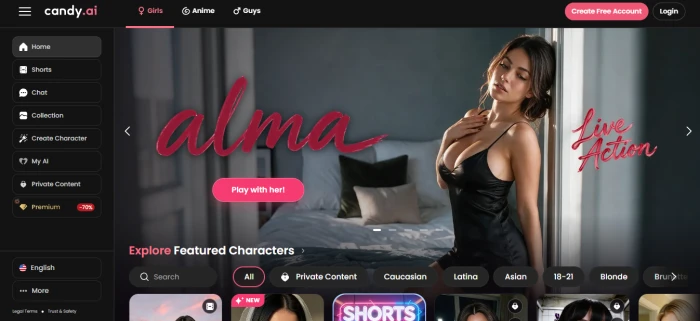
The homepage opens directly onto a grid of companion cards, each showing a portrait, a name, and a short personality line. The main menu (chat, collection, create character, premium) is visible from the start, so the product's scope is clear within seconds.
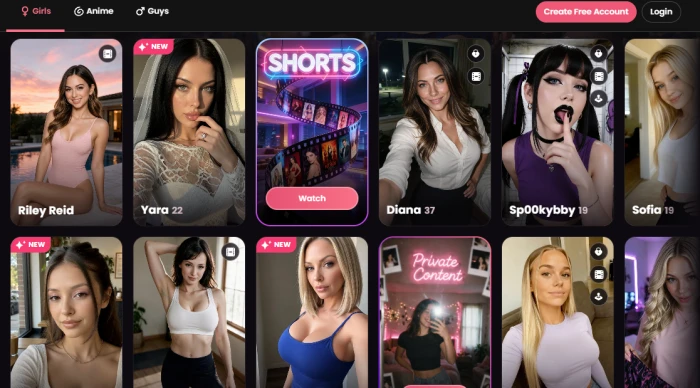
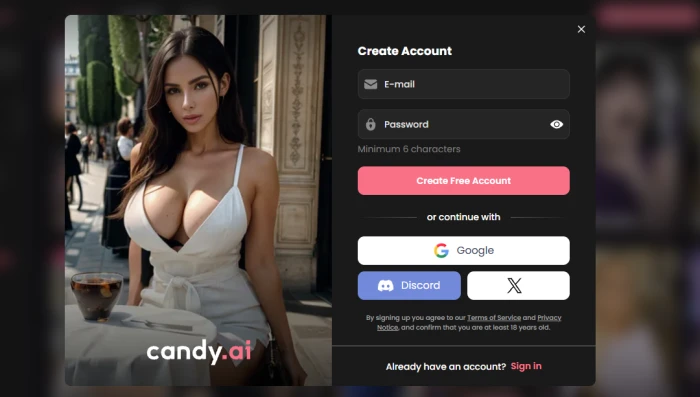
Further down, filters let the tester narrow the gallery by style and theme without clicking into anything. Browsing is free, but clicking on any companion triggers a registration wall. The tester could sign up with an email address and password, or skip the form by logging in through Google, Discord, or X. The screen is minimal and its purpose is clear: chat, images, and video all stay locked until the account is created and the email is confirmed. A new free account starts with zero tokens, which matters for everything that follows.
Step 2: Chatting and using the media tools
After logging in, the tester selected a companion and opened the chat. This is the core of the product, and it requires no explanation: a message box at the bottom, replies appearing above it, exactly like any messaging app. The companion stayed in character and reacted to what was typed rather than falling back on generic lines. There was no tutorial and none was needed.
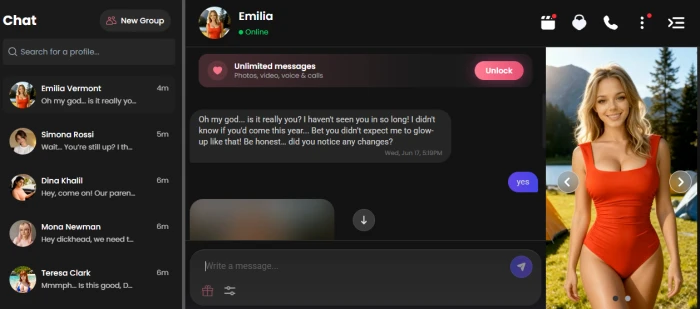
The image and video buttons are placed just beneath the message box, so the tester could ask for a picture or a short clip without leaving the conversation. Text and media run in a single thread rather than in a separate generator tool, which keeps the roleplay from being interrupted. This is one of the better design decisions on the platform, with one catch that only becomes obvious later: every one of those requests is priced in tokens.
Step 3: Where the free tier stops
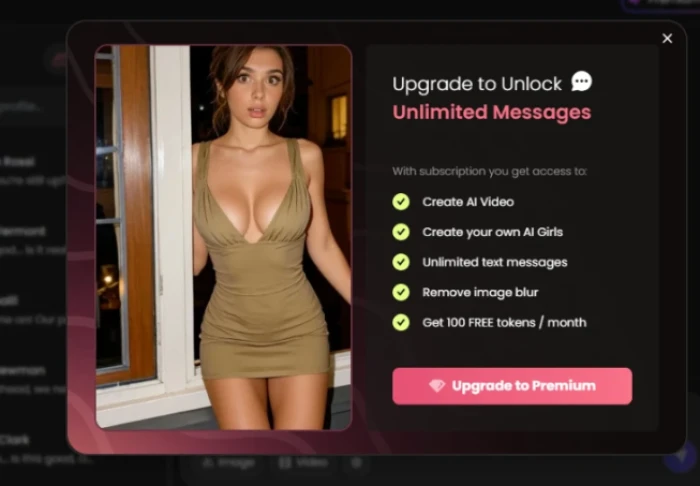
This is the point where the experience changes. After only a handful of messages and a couple of media requests, an upgrade prompt appeared and would not go away. That matches what Candy AI's own help centre says a free account gets: 5 chat messages in total across all characters (not per day), one custom character, and one image. There is no monthly token allowance on the free plan at all. The upgrade prompt lists what is locked: unlimited messaging, AI video, the custom character builder, unlocked images, and the 100 monthly tokens that come with Premium. The free tier is a sample rather than a working version of the product.
| Free account includes | Limit |
|---|---|
| Chat messages | 5 in total, across all characters |
| Custom characters | 1 |
| Image generation | 1 image |
| Tokens | 0 |
| Voice calls and video | Not available |
Step 4: The subscription screen and what it costs
Trying to continue led straight to the pricing page. Candy AI sells one Premium tier, and the only thing that changes is the billing cycle. Every plan includes unlimited text chat and 100 tokens per month. A higher Premium Plus tier with 330 tokens a month exists inside the account, but its price is not shown on the public pricing page.
| Plan | Price per month | Billed as | Tokens per month |
|---|---|---|---|
| Premium, monthly | $13.99 | $13.99 every month | 100 |
| Premium, 3 months | $8.99 | $26.97 every 3 months | 100 |
| Premium, 12 months | $3.99 | $47.88 per year | 100 |
| Extra tokens | $9.99 | One-time, per 100 tokens | 100 |
Tokens are the real cost to watch, because every feature outside plain text chat draws from the same 100-token pool. Candy AI's help centre explains what tokens are for but does not publish a per-action price list, so the figures below are what the app charged inside the account during recent tests.
| Feature | Token cost | What 100 tokens covers |
|---|---|---|
| Standard image | 2 tokens | About 50 images |
| Explicit (18+) image | 4 tokens | About 25 images |
| Voice call | 3 tokens per minute | About 33 minutes |
| Video clip, 5 seconds | 12 tokens | 8 clips |
| Video clip, 10 seconds | 20 tokens | 5 clips |
| Creating a custom character | About 10 tokens | 10 characters |
Put together, a session with one new character, ten explicit images, and a five-minute call uses 65 of the month's 100 tokens. Light users who mostly chat and request the odd picture will stay inside the allowance; anyone who wants regular images, voice, or video should expect to buy extra packs, which is why the real monthly cost often lands well above the plan price.
Pros and cons
What's genuinely good
- You can browse the full character gallery before creating an account, so you know what you’re getting into.
- Sign-up is quick: email and password, or one click with Google, Discord, or X.
- The chat needs no explanation. It looks and behaves like a normal messaging app.
- Image and video buttons sit under the message box, so you request media without leaving the conversation.
- Responses come back fast, which keeps roleplay from stalling.
- Custom character creation gives you real control over personality and backstory.
What holds it back
- The free tier is a demo. A dozen or so messages and two media requests is roughly where the wall comes up.
- Upgrade prompts interrupt the flow instead of waiting until you’ve settled in.
- Everything that makes the platform appealing (unlimited chat, video, custom characters, blur removal) is behind the subscription.
- Tokens drain fastest on the exact features you’re paying for, so the real monthly cost is hard to predict.
- Memory is inconsistent. Characters can lose details or drift into shorter, generic replies over long sessions.
How we rated Candy AI?
| What was tested | Score | How it feels | Verdict |
|---|---|---|---|
| First impression Step 1 |
9 / 10
|
Polished and inviting. The companion gallery sells the product before a single click, and the layout makes it obvious what the platform does. | Excellent |
| Sign-up and onboarding Step 2 |
8 / 10
|
Quick and painless with Google, Discord, or X login. The only friction is that nothing can be tried until the account exists. | Good |
| Chat experience Step 3 |
9 / 10
|
Feels like texting a real contact. Replies are fast, stay in character, and there is no learning curve at all. | Excellent |
| Images and video in chat Step 3 |
8 / 10
|
Convenient. Media requests sit right inside the conversation, so the roleplay never breaks. The catch is that every request burns tokens. | Good |
| Free tier value Step 4 |
3 / 10
|
A short preview, not a usable product. The upgrade wall appears after roughly a dozen messages and does not go away. | Weak |
| Pricing and token value Step 5 |
5 / 10
|
Plan prices are clear and the annual rate is cheap, but the token meter makes the real monthly cost hard to predict for anyone who uses images or video regularly. | Average |
Should you use Candy AI?
Candy AI gets the fundamentals right. The character gallery is easy to browse, sign-up takes a minute, and the chat works the way a messaging app does, so there is nothing to learn before the first conversation starts. Image and video requests sit inside the chat rather than in a separate tool, and the output quality holds up. The catch is that almost none of this is available for free. A handful of messages and a couple of media requests is all the trial gives before the upgrade screen appears, and once subscribed, the token meter decides how much of the good stuff you actually get to use. It is worth it if you want a browser-based companion with real character depth and built-in media and you are fine paying from day one. It is not worth it if you expect a usable free tier or need to know your monthly cost before committing, because tokens drain fastest on exactly the features that make the platform worth paying for. Judged as a paid product, it earns its score. Judged as a free one, it is a preview.
Discussion · 0
Sign in to join the discussion.
No comments yet — be the first to start the discussion.