

Genspark AI review
Genspark AI turns prompts into research, documents, and dashboards
Genspark AI is an all-in-one workspace for searching, writing, designing, analyzing files, and generating media from natural-language prompts. It suits people who want one place for AI research and content production, with many task-specific tools under one account.
What Genspark AI actually is
Genspark AI is an all-in-one AI assistant that combines conversational chat, real-time web research, content creation, and task automation in a single workspace. Users can ask questions, research complex topics, summarize information, analyze data, and create presentations, documents, spreadsheets, images, and videos. Its Super Agent can handle multi-step tasks, while access to multiple AI models helps support different types of requests. Genspark also supports coding, file analysis, and integrations with external apps. It is especially useful for students, researchers, content creators, and professionals who need more than basic chatbot responses.
The short version
How we tested Genspark AI?
Step 1: The workspace homepage
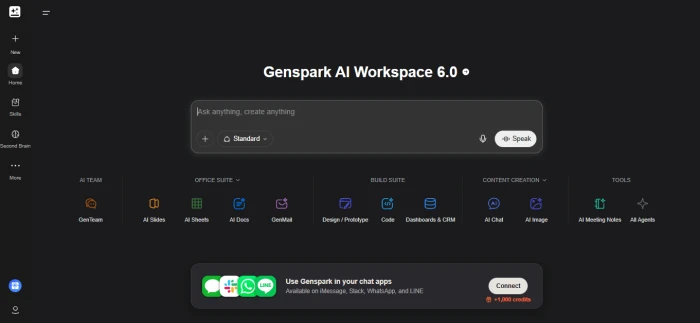
Genspark opens on a dark, single-screen workspace labelled Workspace 6.0. The prompt bar in the centre reads "Ask anything, create anything" and comes with a Standard mode selector, a microphone, and a Speak button for voice input. The left rail holds New, Home, Skills, Second Brain, and More. Below the prompt bar, the tools are grouped into five columns: AI Team (GenTeam), Office Suite (AI Slides, AI Sheets, AI Docs, GenMail), Build Suite (Design / Prototype, Code, Dashboards & CRM), Content Creation (AI Chat, AI Image), and Tools (AI Meeting Notes, All Agents). A banner at the bottom offers to connect Genspark to iMessage, Slack, WhatsApp, and LINE in exchange for 1,000 bonus credits, which is the first hint that the free account runs on a credit balance rather than a hard message cap.
Step 2: Generating an image from the main prompt bar
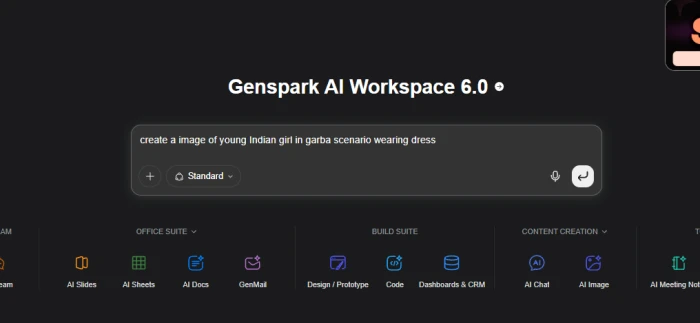
Rather than opening the AI Image tool, the tester typed directly into the main prompt bar: "create a image of young Indian girl in garba scenario wearing dress". The prompt was deliberately short and unpolished to see how much Genspark would fill in on its own.

Genspark rewrote the request into a full photorealistic brief before generating anything: a young woman dancing garba on Navratri night in a pink and orange chaniya choli with mirror-work embroidery, oxidized silver jhumkas, dandiya sticks in hand, string lights, marigold garlands, and a decorated pandal in the background with other dancers blurred in motion. The expanded prompt is shown next to the output, so the tester could see exactly what was added. The image itself, produced by GPT Image 2 at 1122 x 1402, matched that brief closely: the outfit detail, the mid-twirl pose, the lighting, and the crowd blur all landed. Download, copy, and Remix buttons sit under the result for quick iteration.
Step 3: Asking Dashboards and CRM for a reading list workspace
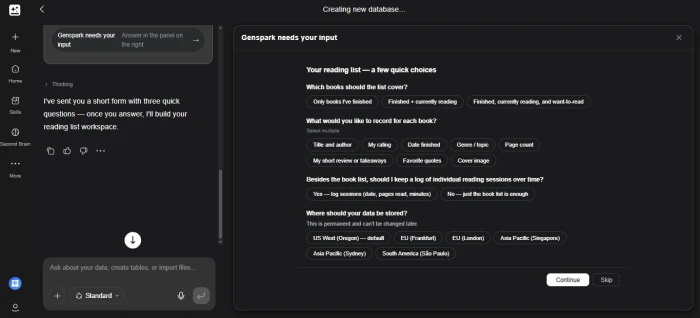
Next, the tester asked Dashboards & CRM to build a reading list workspace. Instead of guessing, Genspark replied that it had sent a short form with a few questions and opened a "Genspark needs your input" panel. The form asked which books the list should cover (finished only, finished plus currently reading, or everything including want-to-read), which fields to record for each book (title and author, rating, date finished, genre, page count, short review, favourite quotes, cover image), whether to log individual reading sessions over time, and which region the data should live in, with a warning that the storage location is permanent. Continue and Skip buttons let the tester move on either way. This clarification step is a small thing, but it is the difference between a generic template and a database shaped around the request.
Step 4: The finished Reading List workspace
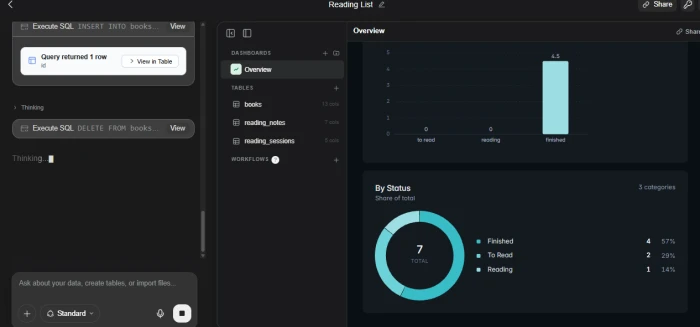
After the form was submitted, Genspark built the whole thing without further input. The left panel shows it executing SQL directly, with INSERT INTO books and DELETE FROM books statements and a "Query returned 1 row" result that can be opened in a table view. The workspace itself contains three tables (books, reading_notes, and reading_sessions) and an Overview dashboard with a bar chart and a "By Status" donut showing 7 sample books: 4 finished (57%), 2 to read (29%), and 1 currently reading (14%). A Share button sits in the top corner, and the bottom prompt bar invites follow-up requests such as adding tables or importing files. Going from a one-line request to a working, pre-populated database with charts took a few minutes and no manual setup.
Step 5: Testing AI Chat
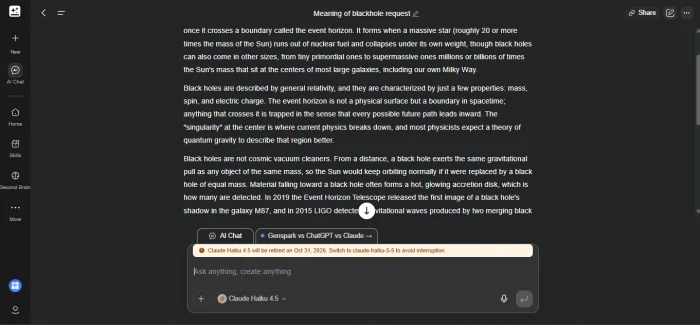
The tester then opened AI Chat and asked what a black hole actually means. With Claude Haiku 4.5 selected by default, the reply was long and well structured: it explained the event horizon, how black holes form when massive stars collapse, why general relativity describes them by only mass, spin, and electric charge, what the singularity is, why they are not cosmic vacuum cleaners, and it closed with the 2019 Event Horizon Telescope image of M87 and the 2015 LIGO gravitational wave detection. Two details stood out in the interface. A tab beside the chat offers a "Genspark vs ChatGPT vs Claude" comparison, and a notice above the input warns that Claude Haiku 4.5 will be retired on October 31, 2026, with a prompt to switch to the newer Haiku model. Chat worked on the free account in this test, and the answer quality was on par with using the model directly.
Step 6: The upgrade screen and what it costs
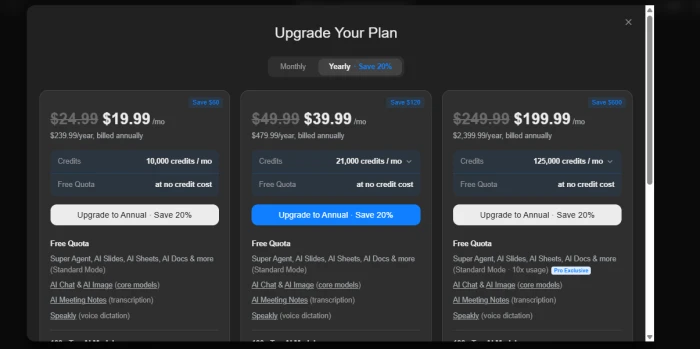
To see what paying adds, the tester opened the Upgrade Your Plan screen. There are three tiers, distinguished by credit volume rather than by name, and a Monthly / Yearly toggle with the yearly option saving 20%. All three list the same free quota that does not draw on credits: Super Agent, AI Slides, AI Sheets, and AI Docs in Standard Mode, AI Chat and AI Image on core models, AI Meeting Notes transcription, and Speakly voice dictation. The top tier adds 10x usage on that Standard Mode quota as a Pro-exclusive perk.
| Plan | Monthly billing | Yearly billing (per month) | Charged per year | Credits per month |
|---|---|---|---|---|
| Tier 1 | $24.99 | $19.99 | $239.99 | 10,000 |
| Tier 2 | $49.99 | $39.99 | $479.99 | 21,000 |
| Tier 3 (Pro) | $249.99 | $199.99 | $2,399.99 | 125,000 |
The free account was enough to generate an image, build a database, and hold a full chat in this test, so the paid tiers are about headroom rather than unlocking the basics. Credits are what run out: heavier agent tasks, slides, video, and long-running jobs all draw on the monthly pool, and the jump from 10,000 to 125,000 credits is the main reason to move up a tier.
Pros and cons
What's genuinely good
- The tool range is unusually broad, so one workspace can cover PDFs, slide decks, dashboards, images, audio, and video drafts.
- Plain-English dashboard creation is useful for non-technical teams that need charts without writing SQL or rebuilding spreadsheets manually.
- The model list includes recognizable text, image, and video options, which helps when a task needs a specific generation style.
- The multilingual interface and regional editions make it more practical for mixed-language teams than many English-first AI workspaces.
What holds it back
- The large tool catalog can feel crowded, and finding the right generator often takes trial and error at first.
- Pricing, credit use, and model-specific limits are not obvious from the extracted site text, which makes budgeting harder before signup.
- It is not a replacement for specialist tools when you need detailed design layers, formal BI governance, or production video editing controls.
- Dashboard sharing sounds convenient, but teams still need to verify data access, refresh behavior, and permissions before using it operationally.
- Cookie blocking prevents sign-in, so browser privacy settings can stop you before you even reach the workspace.
How we rated Genspark AI?
| What was tested | Score | How it feels | Verdict |
|---|---|---|---|
| First impression Step 1 |
7.5 / 10
|
Capable but crowded. Fourteen tools across five columns land on the first screen, so it is clear what Genspark can do but not where to start. A newcomer will spend the first minute reading labels rather than working. | Good |
| Image generation Step 2 |
8.5 / 10
|
The strongest single result. A rough one-line prompt was expanded into a detailed brief and rendered cleanly by GPT Image 2, with the expanded prompt shown for transparency. It loses a little only because the heavy rewrite means the output is partly Genspark's idea rather than the user's. | Excellent |
| Database and dashboard building Steps 3 and 4 |
8.5 / 10
|
Genuinely useful. Genspark asked sensible questions first, then built three tables, sample data, and a charted Overview on its own. The one caution is the permanent storage region choice buried in the form, which is easy to click past and impossible to undo. | Excellent |
| AI Chat Step 5 |
7.5 / 10
|
Fine, but ordinary. The black hole answer from Claude Haiku 4.5 was thorough and well organised, yet it is the same answer the model gives anywhere else. The retirement notice above the input also shows that model availability here is decided by third parties, not by Genspark. | Good |
| Free tier value Steps 1 to 5 |
7 / 10
|
Enough to evaluate, not enough to rely on. An image, a database, and a full chat all worked without paying, and connecting a chat app adds 1,000 bonus credits. But the balance is a daily allowance, so a second or third real task is where the free account starts to run dry. | Good |
| Pricing and credit value Step 6 |
5.5 / 10
|
The weak spot. Plan prices are clear and the 20% yearly saving is easy to read, but the tiers are unnamed, the middle plan doubles the price for only twice the credits, and the jump to $199.99 a month is steep. Credits, not the subscription, decide what you actually get, and the screen does not say how fast they go. | Average |
| Overall Average of all six |
7.4 / 10
|
Strong at building things, average at explaining what they cost. The image and database tools earn the score; the crowded homepage, a chat experience no better than the models underneath, and an opaque credit system hold it back from going higher. | Good |
Should you use Genspark AI?
Genspark AI is strongest as a broad AI workbench for people who jump between research, content, visuals, documents, and lightweight data analysis. I would choose it for exploratory work and quick deliverables, but I would still keep specialist tools for governed analytics, advanced design, and production-grade media.
Discussion · 0
Sign in to join the discussion.
No comments yet — be the first to start the discussion.