
Grammarly review
For writers who need cleaner work across everyday apps
For students, professionals, and teams, Grammarly catches grammar, tone, clarity, and consistency issues while you write. It stands out because it works in browsers, desktop apps, mobile keyboards, Google Docs, Microsoft Office, and its own editor.
What Grammarly actually is
Grammarly is best treated as a writing layer that follows you across the places where drafts actually happen.
Where Grammarly fits into daily writing
The free account covers spelling, grammar, basic tone signals, and 100 AI prompts per month, which is enough for light email and short-form writing. The Pro plan adds full-sentence rewrites, tone adjustment, English fluency help, inclusive language suggestions, plagiarism checks, AI text detection, and 2,000 AI prompts per member per month.
Its reach is the main reason to use it over a basic editor. Grammarly works through extensions for Chrome, Safari, Firefox, and Edge, plus apps for Windows, Mac, iPhone, iPad, and Android. It also works in Google Docs and Microsoft Office apps, which reduces copy-pasting between tools.
Plan differences that matter
| Plan | Price | Key limit |
|---|---|---|
| Free | $0 per month | 100 AI prompts per month |
| Pro | $12 per month | 2,000 AI prompts per member per month |
| Enterprise | Contact sales | Unlimited prompts per member per month |
Grammarly Pro supports individual users and teams up to 149 seats. Larger organizations move to Enterprise, which adds dedicated support, custom roles and permissions, data loss prevention, cost center visibility, BYOK encryption, and broader controls through Superhuman Go.
The short version
How we tested Grammarly?
Step 1: Upload a PDF and review the Proofread results
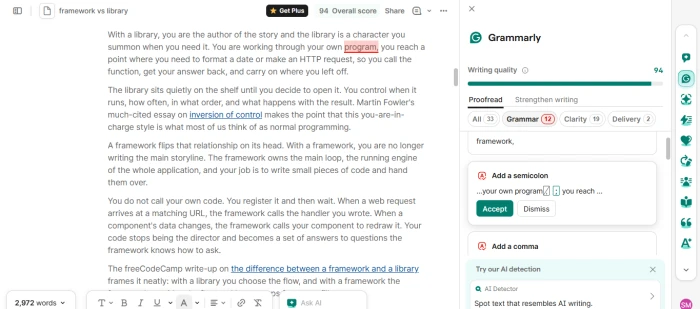
After uploading the document, Grammarly gave it a Writing quality score of 94 and listed 34 suggestions under the Proofread tab: 12 for grammar, 20 for clarity, and 2 for delivery. Suggestions like "Add a semicolon" and "Improve wording" came with Accept and Dismiss buttons and worked without any upgrade. The right-hand sidebar also surfaced the full toolset: AI Chat, AI Detector, AI Rewriter, Humanizer, Paraphraser, Resume Builder, Reader Reactions, Citation Finder, and AI Grader.
Step 2: Switch to the Strengthen writing tab
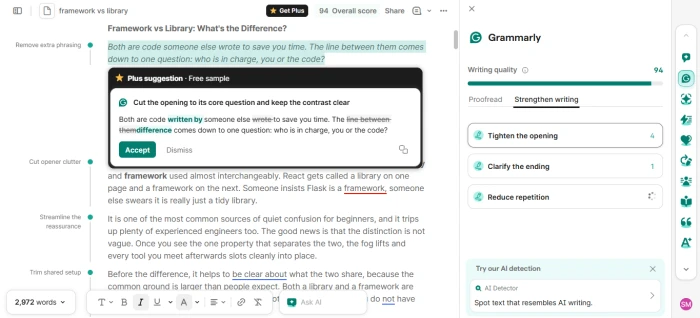
The Strengthen writing tab grouped deeper edits into three cards: Tighten the opening (4), Clarify the ending (1), and Reduce repetition. Clicking the first one opened a single "Plus suggestion · Free sample" that showed the full rewrite with tracked changes and let us accept it. This was the only strengthen-level edit we could apply on the free plan.
Step 3: Open the remaining suggestions
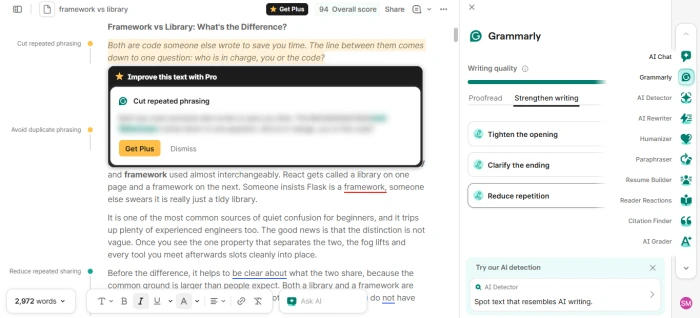
Every suggestion after the free sample, including "Cut repeated phrasing" and "Avoid duplicate phrasing", opened as "Improve this text with Pro". The suggested rewrite was blurred out, and the only actions were Get Plus or Dismiss. The sidebar still counted these as available suggestions, so the number shown does not reflect what a free user can use.
Step 4: Try the AI Rewriter
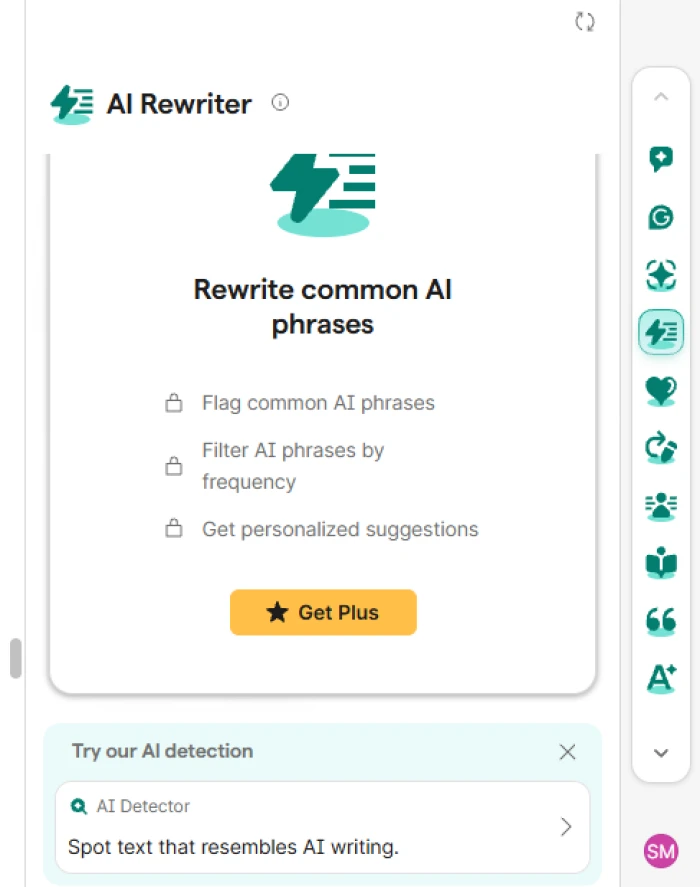
Opening the AI Rewriter from the sidebar showed no results at all on the free plan. Instead it displayed a locked feature list, flag common AI phrases, filter AI phrases by frequency, and get personalized suggestions, with a Get Plus button underneath. There was no free sample here, unlike the Strengthen writing tab.
Step 5: Test the Humanizer
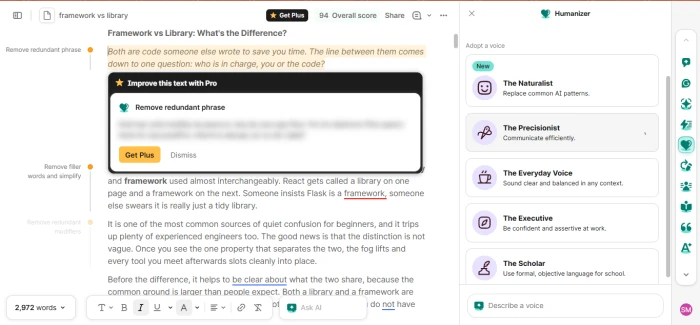
The Humanizer let us browse its voice presets, The Naturalist, The Precisionist, The Everyday Voice, The Executive, and The Scholar, and it flagged edits in the margin such as "Remove redundant phrase" and "Remove filler words and simplify". Clicking any of them produced the same "Improve this text with Pro" overlay with the rewrite hidden. The voices are visible, but applying them is a paid action.
Step 6: Test the Paraphraser
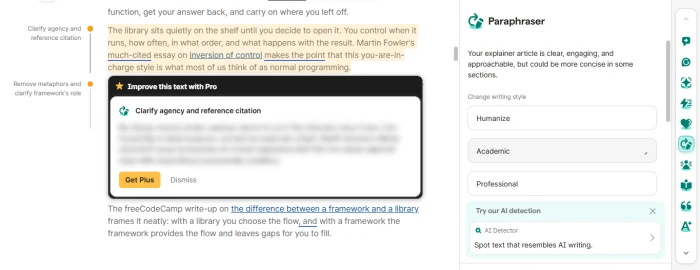
The Paraphraser summarized the article as clear and engaging but "could be more concise in some sections", and offered Humanize, Academic, and Professional styles. Its margin suggestions, such as "Clarify agency and reference citation" and "Remove metaphors and clarify framework's role", followed the same pattern: one preview, then the Get Plus wall. Across every tool we tried, the free plan showed a single piece of feedback and placed the rest behind the upgrade.
What the testing showed
The free plan does real work on grammar, spelling, and clarity, and the 34 proofread suggestions were usable without paying. The AI-powered tools are a different story. Each one reveals just enough to show what it would fix, then hides the actual rewrite behind Get Plus, which makes the sidebar feel more like a sales funnel than a toolkit until you upgrade.
Pros and cons
What's genuinely good
- The browser and desktop coverage means Grammarly catches issues in real writing contexts, not only after pasting text into an editor.
- Free users get meaningful grammar, spelling, tone, and 100 monthly AI prompts without needing a credit card.
- Pro’s full-sentence rewrite suggestions are practical for emails and reports where the sentence works but sounds clumsy.
- The plagiarism and AI text checks live inside the same document flow, which saves time for students and content teams.
- Enterprise has real admin controls like DLP, BYOK encryption, roles, permissions, and cost center visibility for managed deployments.
What holds it back
- The $12 Pro price is listed monthly, but buyers still need to check billing terms before assuming month-to-month flexibility.
- AI detection should not be treated as proof of authorship, especially for academic or disciplinary decisions.
- The free plan’s 100 AI prompts can disappear quickly if you use Grammarly for drafting rather than correction.
- Some suggestions flatten personal voice, so accepting every rewrite can make emails and essays sound overly polished.
- Enterprise pricing is not public, which makes budgeting slower for teams that need admin controls before a pilot.
How we rated Grammarly?
| What was tested | Score | How it feels | Verdict |
|---|---|---|---|
| Upload and proofread Step 1 |
9 / 10 |
Fast and accurate. The PDF was scored and marked up within seconds, and all 34 grammar, clarity, and delivery suggestions worked with Accept and Dismiss on the free plan. | Excellent |
| Strengthen writing Step 2 |
6 / 10 |
Promising but short. The one free sample was a clean rewrite with tracked changes, and it is the only strengthen-level edit a free user gets. | Average |
| Locked suggestions Step 3 |
4 / 10 |
Frustrating. Every suggestion after the sample opened as a blurred "Improve this text with Pro" box, yet the sidebar still counts them as if they were available. | Weak |
| AI Rewriter Step 4 |
3 / 10 |
Nothing to try. The panel shows a locked feature list and a Get Plus button, with no free sample at all. | Weak |
| Humanizer Step 5 |
5 / 10 |
Window shopping. The five voice presets are visible and the margin flags real edits, but applying any of them hits the Pro wall. | Average |
| Paraphraser Step 6 |
5 / 10 |
Same pattern. Style options and a one-line assessment are free; the actual rewrites sit behind Get Plus. | Average |
Should you use Grammarly?
Grammarly is worth using if writing quality affects your grades, client work, hiring emails, support replies, or internal documents. The free plan is strong enough for basic cleanup, while Pro is the better fit when rewrites, originality checks, and higher AI limits are part of the job. I would not rely on its AI detector as an authority, but as a writing assistant it remains one of the most practical options available.
Discussion · 0
Sign in to join the discussion.
No comments yet — be the first to start the discussion.