

Humanize.ai review
For quick rewrites when AI text sounds too mechanical
For writers, marketers, and students who already have an AI draft, Humanize.ai rewrites pasted text into more natural wording. Its free web tool is unusually low-friction, with no signup required, but paid pricing is not clearly visible at checkout.
What Humanize.ai actually is
Humanize.ai is a focused rewrite tool for making AI-generated text read less formulaic.
Rewrite flow and daily use
The main workspace is simple: paste text, upload a document, click Humanize Text, then copy or export the output. The page shows word counts for both input and output, which helps when trimming a draft before running it through the tool.
The site positions the tool for emails, articles, reports, documents, marketing copy, and social posts. In practice, it is best treated as a rewriting pass, not a final editor, because you still need to check tone, accuracy, citations, and any field-specific wording after the rewrite.
Detector-focused modes and limits
- Standard Humanizer is listed with unlimited words per month and targets ZeroGPT, AiDetector.com, and AiChecker.com.
- Advanced Humanizer is listed with 10,000 words per month and targets Turnitin, Originality.ai, and Copyleaks.
- Advanced refills are listed at $9 for 10,000 words, but the monthly and annual subscription prices are currently not shown.
- The homepage includes an AI detection score powered by AiDetector.com and claims support for more than 100 languages.
Pricing clarity and usage terms
| Tier | What is stated | Price shown |
|---|---|---|
| Free web tool | No signup or credit card required on the main page | $0 stated |
| Standard Humanizer | Unlimited words per month for selected detectors | Not visible |
| Advanced Humanizer | 10,000 words per month, with refill option | Refills $9 per 10,000 words |
The terms say payments are recurring when a paid service is purchased, cancellation stops future charges, and payments are generally non-refundable. They also say bypassing detection is not guaranteed, which is important given how detector scores can vary across tools and drafts.
The short version
How we tested Humanize.ai?
Step 1: Pasting a paragraph and running the rewrite
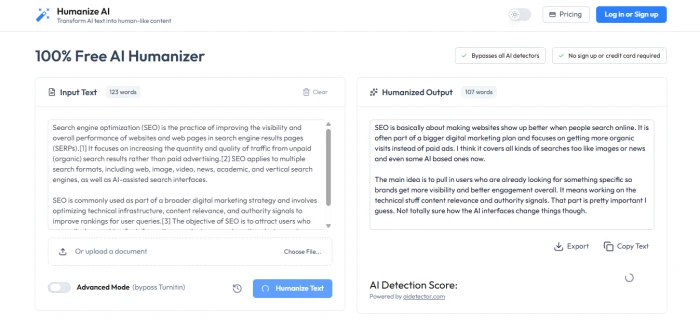
Input on the left, rewrite on the right, with the detection score still loading below.
The site opens straight onto the tool under the heading "100% Free AI Humanizer", with two badges promising detector bypass and no sign-up or card. The tester pasted a 123-word paragraph about search engine optimisation lifted from a public web page, left the Advanced Mode toggle (labelled "bypass Turnitin") off, and clicked Humanize Text. The rewrite appeared in the right-hand panel within a few seconds at 107 words. The tone shifted from encyclopaedic to chatty, with filler like "I think" and "I guess" dropped in, and the citation markers from the source were stripped out. Export and Copy Text buttons sit under the output, and an AI Detection Score box, attributed to aidetector.com, loads just beneath them.
Step 2: Exporting the result
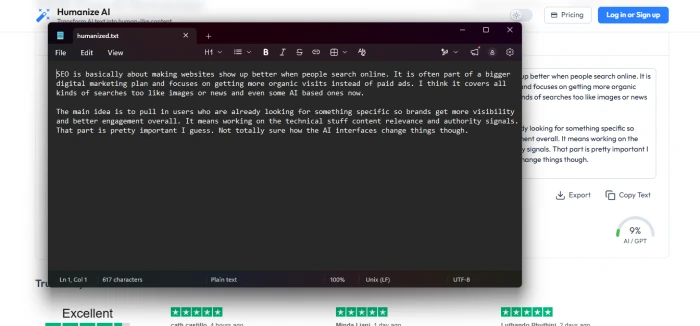
Export saves a plain .txt file; the 9% score is visible in the background.
Clicking Export downloaded a file called humanized.txt immediately, with no account prompt. Opened in a text editor it was 617 characters of plain text, exactly what the output panel showed, with no formatting or metadata. By this point the detection score had finished loading and read 9% AI/GPT. For a quick copy-out that is fine, but anyone expecting a .docx or formatted export will need to paste the text into their own document instead.
Step 3: Uploading a full Word document
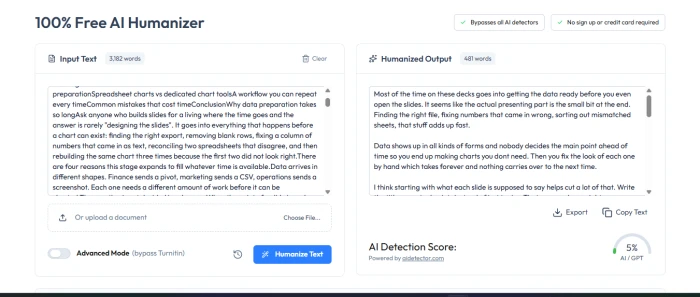
A 3,182-word upload came back as 481 words with a 5% score.
Next the tester used the Choose File option to upload a Word document of 3,182 words, an article on preparing data for slide decks. The text loaded into the input box on its own, headings and all, and a single click on Humanize Text produced the rewrite within seconds. The detection score came back at 5% AI/GPT, the lowest of the session. The catch is the length: the output was 481 words, roughly 15% of the original. The rewrite reads naturally and keeps the main argument, but most of the detail, structure, and section headings are gone. On long documents this is a summariser as much as a humanizer, so the word counters on both panels are worth checking before copying anything out.
Step 4: Hitting the free limit
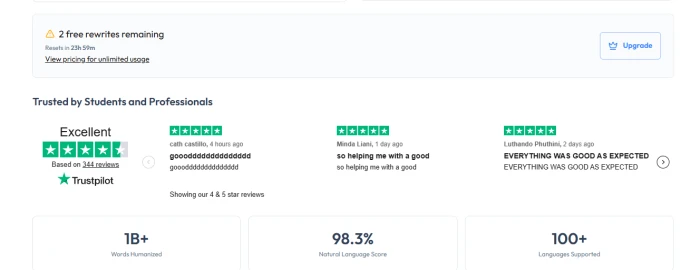
The remaining-rewrites counter and upgrade prompt below the editor.
Scrolling below the editor after the two runs showed a warning bar reading "2 free rewrites remaining", with a reset timer of just under 24 hours, a link to view pricing for unlimited usage, and an Upgrade button. So the free tier is counted in rewrites per day rather than words, and the homepage's "100% free" headline holds only for a handful of runs. Below that sits a Trustpilot block showing an Excellent rating from 344 reviews, though the carousel is labelled as showing only 4- and 5-star reviews, and the sample reviews on display are one-line comments. The page closes with three stat tiles: 1B+ words humanized, a 98.3% natural language score, and 100+ languages supported, none of which are explained or sourced.
| Test | Input | Output | Detection score |
|---|---|---|---|
| Pasted paragraph | 123 words | 107 words | 9% AI/GPT |
| Uploaded Word document | 3,182 words | 481 words | 5% AI/GPT |
| Free allowance | Counted per rewrite, resets daily; 2 remaining after the session | ||
Pros and cons
What's genuinely good
- The free editor is quick to try because it does not require an account or payment card on the main page.
- Input and output word counters make it easier to manage drafts before copying the rewritten version elsewhere.
- Document upload is useful for longer work where pasting from a file would break formatting or slow the workflow.
- The tool separates standard and advanced humanizing, so heavier detector-focused rewriting is not mixed into every basic rewrite.
- Published terms openly state that detector bypass is not guaranteed, which sets a more realistic expectation than the homepage headline.
What holds it back
- The pricing page currently hides the actual monthly and annual subscription amounts, making paid-plan comparison difficult before checkout.
- Advanced Humanizer is limited to 10,000 words per month unless you buy refills, which can disappear quickly on long documents.
- The terms describe the AI tools as for personal and experimental use only, which conflicts with the homepage’s professional-use positioning.
- Payments are generally non-refundable after purchase, so testing the free tool first matters more than with flexible refund policies.
- The tool is built around detector avoidance, so academic or compliance-sensitive users need to check their institution’s rules before using it.
How we rated Humanize.ai?
| What was tested | Score | How it feels | Verdict |
|---|---|---|---|
| First impression Step 1 |
9 / 10 |
No landing page, no sign-up, no card. The editor is the homepage, and the first rewrite is one paste and one click away. | Excellent |
| Rewrite quality Step 1 |
8 / 10 |
Reads like a person wrote it. The SEO paragraph kept its meaning and scored 9% AI, though the added "I think" and "I guess" filler needs a quick edit before use. | Good |
| Speed Steps 1 and 3 |
9 / 10 |
Fast on both runs. A 123-word paragraph and a 3,182-word document each came back within seconds, with only the detection score lagging behind. | Excellent |
| Export Step 2 |
8 / 10 |
Instant and unrestricted. The .txt downloaded without an account prompt and matched the output exactly. Plain text only, so formatting has to be rebuilt elsewhere. | Good |
| Document upload Step 3 |
7 / 10 |
Effortless to use and scored 5% AI, but 3,182 words came back as 481. On long documents it summarises as much as it humanizes, so the word count needs checking every time. | Good |
| Free tier and pricing Step 4 |
6 / 10 |
Usable but short. A few rewrites a day is enough to test properly, which is more than most rivals give, but the "100% free" headline oversells it and the paid plan price is not shown until checkout. | Average |
Should you use Humanize.ai?
Humanize.ai is useful when you need a fast second pass over AI-written text and want something you can test without creating an account. I would not treat it as a guaranteed detector bypass or a finished writing workflow, especially because paid pricing is not transparent and the terms limit intended use. It works best as a quick rewrite assistant followed by your own editing.
Discussion · 0
Sign in to join the discussion.
No comments yet — be the first to start the discussion.