

NoteGPT review
NoteGPT turns videos, PDFs, and recordings into study-ready notes.
NoteGPT is an AI note-taking workspace for summarizing YouTube videos, PDFs, audio, web pages, and long text. It suits students, researchers, creators, and professionals who want transcripts, mind maps, flashcards, quizzes, and follow-up chat in one place.
What NoteGPT actually is
NoteGPT is strongest as a capture-and-study tool for mixed learning material.
From source to usable notes
The workflow starts with a YouTube link, uploaded audio or video, PDF, article, web page, image, long text, or eBook. NoteGPT can create transcripts, summaries, visual notes, mind maps, flashcards, quizzes, and chat threads around the uploaded source. The note page also supports custom summary prompts and summary language changes, which helps when a lecture needs a tighter exam outline instead of a broad recap.
Three common scenarios fit well: a student turns a lecture recording into a transcript and quiz; a researcher summarizes academic PDFs and asks follow-up questions; a creator extracts talking points from videos, then drafts scripts or audio from the same material.
Credits, plans, and limits
The free account includes 15 monthly quotas. Basic Quota covers summarization, basic transcription, basic-model chat, translation, mind maps, writing, presentations, and math help. Premium Credit covers premium transcription, advanced model chat, speech, podcasts, image generation, video generation, and commercial use of speech and podcast outputs.
| Plan | Monthly price | Main allowance |
|---|---|---|
| Free | $0 | 15 monthly quotas |
| Pro | $9.99 monthly or $108 yearly | 1,000 Basic Quotas and 100 Premium Credits per month |
| Unlimited | $29 monthly or $239 yearly | Unlimited Basic Quotas and 2,800 Premium Credits per month |
| Max | $99 monthly or $829 yearly | Unlimited Basic Quotas and 10,000 Premium Credits per month |
Do use it, don’t force it
Do use it for dense videos, recorded lectures, PDF reading, multilingual summaries, quick study checks, and visual organization. Pro handles 1GB local audio or video files and up to 120-minute YouTube videos without subtitles.
Don’t use it as a low-cost unlimited generator for every AI format. Image, video, premium chat, podcast, and voice features draw from Premium Credits, and AI Agent tasks cannot be estimated exactly before they run.
The short version
How we tested NoteGPT?
Step 1: Home page and sign-in
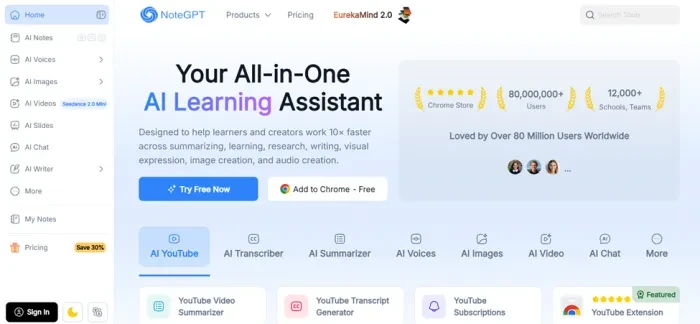
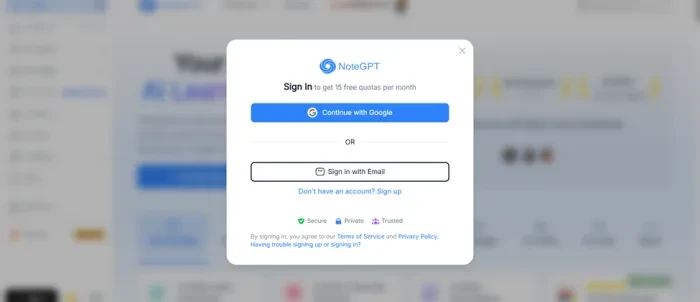
Getting in takes a minute. The home page leads with its numbers (80,000,000+ users, 12,000+ schools and teams, Chrome Store laurels) and a row of tool tabs: AI YouTube, AI Transcriber, AI Summarizer, AI Voices, AI Images, AI Video, AI Chat, and More. Try Free Now opens a sign-in modal with Google or email and the free allowance printed in the header: 15 quotas per month, no card required. The tester signed in with email and was inside in under a minute.
Step 2: Finding the AI Humanizer
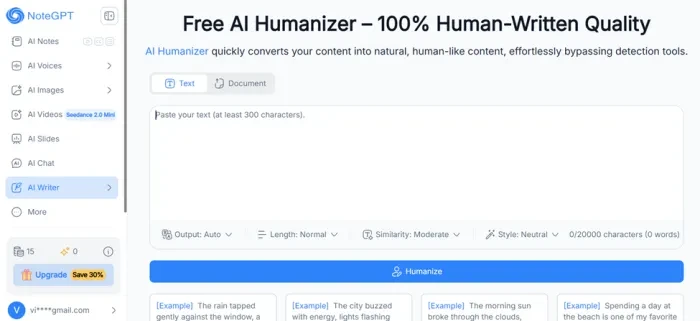
The humanizer does not have its own sidebar entry. It sits under AI Writer next to the AI Detector, Essay Writer, and Grammar Checker. The page headline promises 100% human-written quality, and the subheading claims the tool converts content into natural, human-like text and bypasses detection tools. The input box sets the rules: 300 to 20,000 characters, in Text or Document mode. Four dropdowns control the rewrite (Output: Auto, Length: Normal, Similarity: Moderate, Style: Neutral), and the tester left every one of them untouched. The sidebar counter showed 15 basic quotas and 0 premium credits, with a Save 30% upgrade button that follows you onto every page.
Step 3: Creating a control sample in ChatGPT
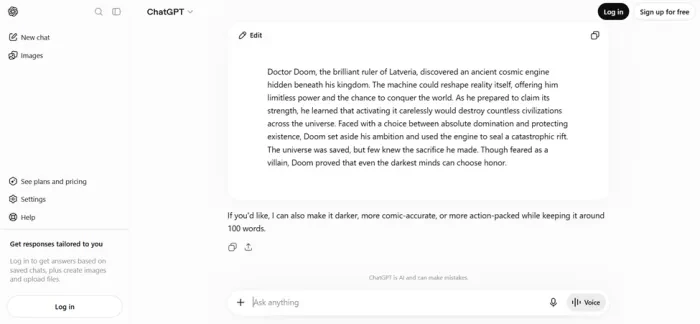
To test the humanizer fairly, the tester needed text that was unmistakably machine-written. A logged-out ChatGPT session was asked for a short story about Doctor Doom, with no custom instructions and no follow-up edits. It returned a 103-word piece about the villain discovering a cosmic engine beneath his kingdom and choosing to seal a rift rather than conquer the universe, then offered to make it darker or more comic-accurate. That raw output, copied exactly as generated, became the sample for every step that follows.
Step 4: Pasting the sample into QuillBot's AI Detector
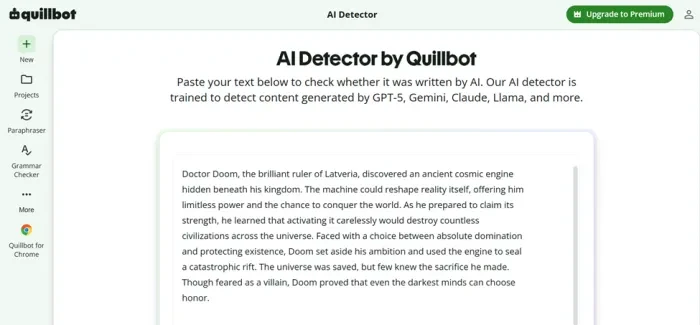
Before touching NoteGPT, the tester needed a baseline from an independent detector. QuillBot's AI Detector was chosen because it names its model version (v7.1.0) and splits results into three buckets: AI-generated, human-written and AI-refined, and human-written. The ChatGPT text was pasted in exactly as generated, 103 words, with nothing altered.
Step 5: The baseline result
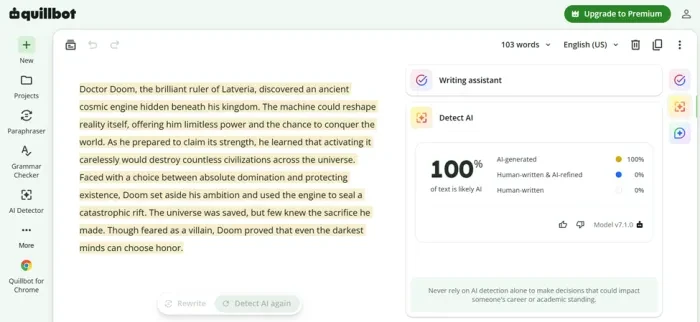
QuillBot called it exactly what it was: 100% AI-generated, 0% human-written and AI-refined, 0% human-written, with every sentence highlighted in yellow. That is as clean a baseline as a test like this can get. Whatever the humanizer did next would be measured against this number.
Step 6: Pasting the text into the NoteGPT humanizer
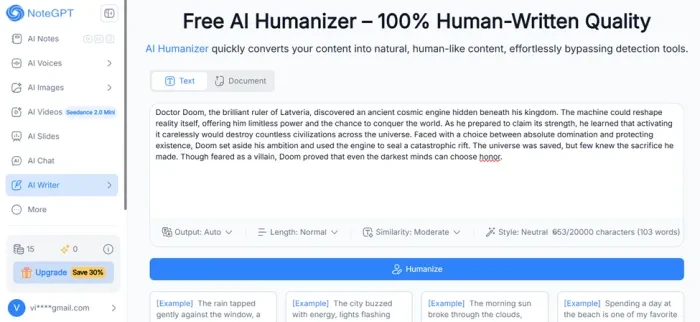
Back in NoteGPT, the tester pasted the same text into the humanizer. The counter read 653 characters and 103 words, comfortably above the 300-character minimum. All four settings were left as found: Output on Auto, Length on Normal, Similarity on Moderate, and Style on Neutral. One click on Humanize started the rewrite, and the cost came out of the free basic quota.
Step 7: The rewrite
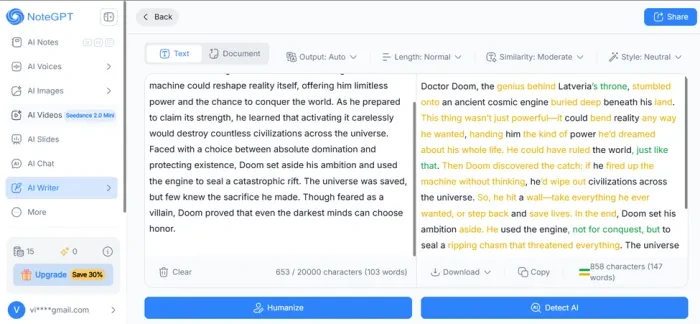
The output view is the best part of the tool: original on the left, rewrite on the right, and every altered phrase colour-coded so the changes can be audited line by line. Download, Copy, and a Detect AI shortcut sit under the result. The rewrite itself was a mixed result. It grew to 858 characters and 147 words, a 43% expansion, and the register shifted from a formal storybook tone to something chattier, with casual filler appearing where the original had none. It reads like a different writer, which is the point, but it would need a cleanup pass before anyone published it.
Step 8: Retesting the rewrite in QuillBot
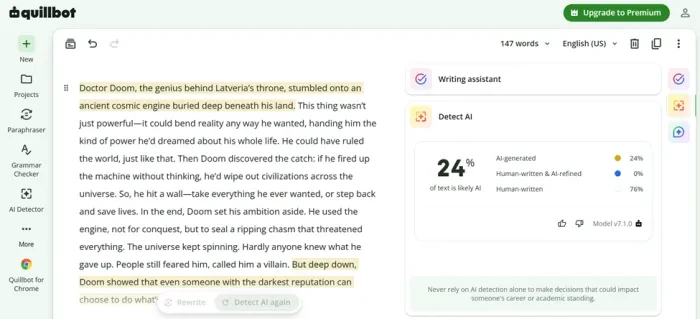
The humanized text went back into QuillBot, same detector, same model version, 147 words this time. The score fell from 100% to 24% AI-generated, with 76% rated human-written and only the opening and closing sentences still flagged. That is a 76-point drop from a single click on default settings, and it is the one number in this test that comes from a tool with no stake in the outcome.
Step 9: NoteGPT's own detector grades the same text
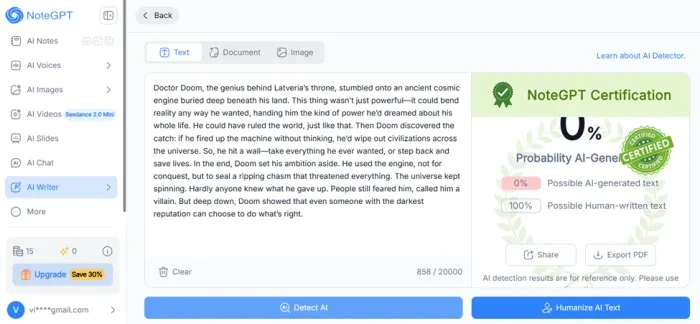
Finally, the tester fed the identical rewrite to NoteGPT's own AI Detector. It returned 0% AI and 100% human-written inside a green "NoteGPT Certification" graphic, complete with Share and Export PDF buttons. Small print under the badge adds that detection results are for reference only.
| Text | Detector | AI-generated score | Length |
|---|---|---|---|
| Original ChatGPT story | QuillBot v7.1.0 | 100% | 103 words, 653 characters |
| After one humanizer pass | QuillBot v7.1.0 | 24% | 147 words, 858 characters |
| After one humanizer pass | NoteGPT AI Detector | 0% | 147 words, 858 characters |
Two detectors, one text, a 24-point disagreement. The honest reading is that the humanizer produces a real, measurable drop on a major third-party detector, but it does not make text undetectable, and the 0% certification from NoteGPT's own tool is a marketing graphic rather than evidence. Anyone submitting work under an originality policy should treat a lower score as a data point, not a clearance.
Pros and cons
What's genuinely good
- The source range is genuinely broad, so one workspace can handle YouTube lectures, PDFs, web articles, recordings, and long text.
- Custom summary prompts make the output more useful for studying, because you can ask for exam notes, takeaways, or a specific structure.
- The free plan gives 15 monthly quotas, enough to test real summaries before paying for Pro, Unlimited, or Max.
- Quota rules are published in detail, including 1 Basic Quota per 10,000 words for many text summaries.
- Paid tiers include commercial use for speech and podcast outputs, which matters for creators turning research into audio content.
What holds it back
- The credit system takes time to understand because Basic Quotas and Premium Credits apply to different tools and media types.
- Premium AI Agent tasks can vary in cost, and NoteGPT says the exact credit use cannot be estimated before a task starts.
- The refund window is only 24 hours after the first purchase, so testing the workflow before subscribing is important.
- Pro is limited to 100 Premium Credits monthly, which can disappear quickly if you use premium transcription, voice, images, and video.
How we rated NoteGPT?
| What was tested | Score | How it feels | Verdict |
|---|---|---|---|
| Getting started Steps 1 and 2 |
8.5 / 10
|
Fast and friction-free. Google or email sign-in, 15 free quotas with no card, and the tester was inside in under a minute. The only snag is that the humanizer is tucked under AI Writer instead of getting its own sidebar entry, and the Save 30% upgrade button follows you everywhere. | Excellent |
| Humanizer controls Steps 2 and 6 |
8.5 / 10
|
Simple and predictable. Four dropdowns, Text or Document mode, a 20,000-character ceiling that swallows a full essay, and a live counter so you know the cost before you click. The 300-character minimum rules out short captions, which is the one real limitation. | Excellent |
| Change transparency Step 7 |
9 / 10
|
The best thing in the test. Original and rewrite sit side by side with every altered phrase colour-coded, so nothing changes behind your back and a line-by-line edit takes minutes. Most rivals hand back a wall of new text and leave you to spot the differences yourself. | Excellent |
| Detector results Steps 5, 8, and 9 |
7.5 / 10
|
The number that counts is QuillBot's: 100% to 24% in one pass on default settings, a 76-point drop from a detector with no stake in the result. NoteGPT's own detector then stamped the same text 0% with a certification badge, which should be ignored; it costs the tool points for overclaiming, not for underdelivering. | Good |
| Rewrite quality Step 7 |
6.5 / 10
|
The meaning survived intact and the text reads naturally, but it came back 43% longer and noticeably more casual, with filler the original never had. Fine as a first draft that you trim; not something to publish untouched. | Average |
| Free tier value Steps 1 to 9 |
8.5 / 10
|
The entire test, humanizer and detector included, ran on the free allowance with quotas to spare. Fifteen basic quotas a month is enough to try every core tool before deciding on Pro. Premium credits sit at zero on the free plan, so image, voice, and video stay out of reach until you pay. | Excellent |
| Overall Average of all six |
8.1 / 10
|
Easy to start, generous for free, and unusually honest about what it changes. The third-party detector drop is real and the highlight view makes the output easy to edit. It loses points only where it oversells itself: a rewrite that needs trimming and a 0% self-certification that no outside detector agrees with. | Excellent |
Should you use NoteGPT?
NoteGPT is a good fit if your main pain is turning mixed content into notes you can review, question, and reuse. It is less attractive if you only need a simple transcript tool or if you dislike monitoring credits across many AI features. The best value is in using it as a study and research hub, not as a general-purpose image, video, and voice generator.
Discussion · 0
Sign in to join the discussion.
No comments yet — be the first to start the discussion.